FitDes
FOUNDATIONS IN IT-PRODUCT DESIGN (FIT_DES)
Project Overview
The Gruppe 7 project addresses a critical need in architectural education: precise and intuitive lighting control for model presentations. Through comprehensive user research at an architecture school, we identified that lighting control is essential for architecture students when presenting and working with physical models. This project delivers an innovative lighting solution that simulates natural sunlight movement while providing intuitive, hands-on control.
Design Process
Our design process followed a user-centered, agile methodology that prioritized understanding real user needs before developing solutions.
Research Phase
We conducted two semi-structured interviews at the architecture school, gaining deep insights into student workflows and lighting preferences:
- First interview focused on work habits and general lighting preferences
- Second interview explored the importance of lighting control in collaborative group work
- Simultaneous observational studies at identified hotspots
- Documentation of existing workflows and pain points
Data Analysis
Using Affinity Diagram methodology, we organized quotes and problems from our focus group, revealing a clear pattern: control over lighting is critically important for architecture students. This insight defined our project scope and direction.
Ideation Phase
We explored two parallel concepts:
- A solution for better task lighting during sketching work
- A design concept for model presentation and model work
After evaluation, we chose the model presentation concept due to its potential for unique interaction possibilities specific to architecture school needs.
Prototyping & Iteration
Our iterative prototyping process included multiple stages:
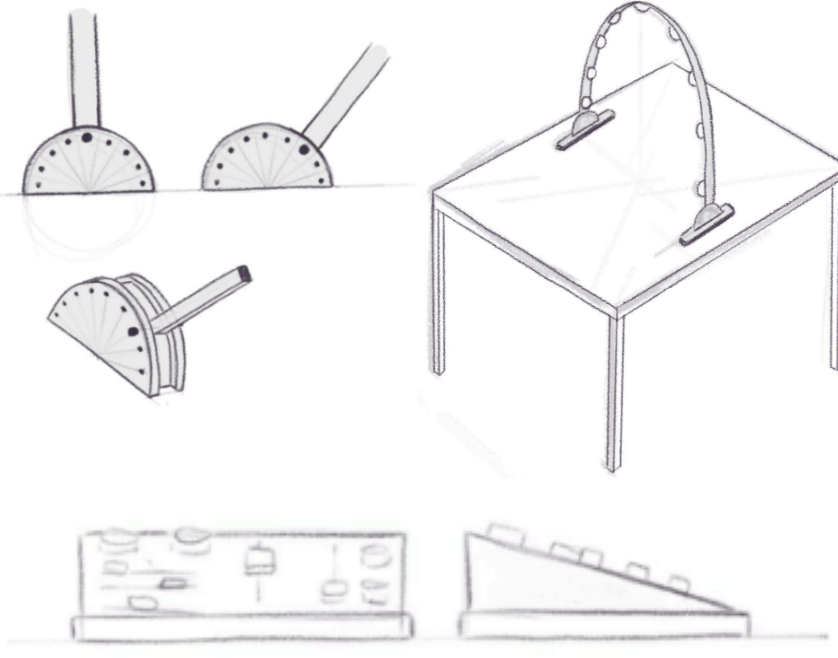
- Low-Fidelity Prototype: Cardboard prototype to test form, size, and lamp functionality
- Dashboard Sketching: Primary interaction interface design with focus on intuitive usability and low learning curve
- Rapid Paper Prototype: Interface mapping and icon selection testing
- Peer Reviews: Collected data on icon choices, component placement, and task completion without introduction
- Final Iteration: Incorporated all findings into the most intuitive design possible
Design Decisions
Curved Lamp Form
The lamp's curved architecture was purposefully chosen to simulate the sun's path across the sky. This design enables:
- Semi-realistic simulation of natural daylight progression
- Integration of spotlights along the curve to visualize transitions
- Intuitive understanding of light angle and direction
Material Selection
Initial iterations used insufficient materials with inadequate locking mechanisms. Through agile design iteration, we addressed:
- Material strength and durability concerns
- Foot locking mechanism reliability
- Overall size optimization for workspace integration
Interface Design
Applied course literature principles throughout the design:
- Feedback System: Green LED indicates when lamp is powered and ready for interaction
- Knobology: Rotary knob design communicates clear affordance for rotation
- UI Design: Interface follows established UI design principles for immediate comprehension
Key Features
- Sunlight Simulation: Curved path mimics natural sun movement for realistic model lighting
- Intuitive Dashboard Control: User-tested interface ensures low learning curve
- Rotational Positioning: Adjustable lamp orientation for different presentation angles
- Integrated Spotlights: Multiple light sources along the curve for precise control
- Visual Feedback: LED indicators provide clear system status
- Collaborative Design: Addresses bottlenecks in group work scenarios
Technical Implementation
Hardware Components:
- Curved lamp housing with integrated spotlight array
- Rotary control mechanism for position adjustment
- LED feedback system for status indication
- Stabilizing foot system with locking mechanism
- Dashboard control panel with intuitive interface
Control System:
- Primary rotary control for lamp positioning
- Dashboard buttons for preset positions
- Intensity controls for different lighting scenarios
- Power status LED feedback
User Research Insights
Our comprehensive research revealed several critical insights:
- Control is Critical: Architecture students require precise lighting control for effective model work
- Group Work Challenges: Existing lighting solutions created bottlenecks in collaborative environments
- Intuitive Interface Need: Students require immediate usability without training
- Natural Light Preference: Simulation of natural sunlight angles improves presentation quality
- Workspace Integration: Solution must fit within existing studio layouts
Reflection & Lessons Learned
Areas for Future Improvement:
Design Refinements:
- More time could have been invested in the relationship between feet and arc when rotating on the axis
- Weight distribution analysis needed earlier in development
- Longer feet could prevent tipping at extreme angles
Process Optimization:
- Earlier commitment to final design direction would have saved resources
- Both initial concepts were valuable but required extensive exploration time
- Some investigated features were ultimately unused
Interface Design:
- More attention to line work between components needed
- Overall layout harmony could be improved
- Additional user testing rounds would have refined the interface further
Development Process:
- Having two programmers from the start would have enabled better collaboration and code quality
- Pair programming opportunities would have strengthened technical implementation
Skills Demonstrated
- User Research: Semi-structured interviews and observational studies
- Data Analysis: Affinity Diagram methodology and insight synthesis
- Interaction Design: User-centered interface design with focus on affordances
- Prototyping: Low to high-fidelity prototype development
- Iterative Design: Agile methodology with continuous user feedback
- Product Design: Form, function, and material selection
- Usability Testing: Peer reviews and task completion analysis
- Team Collaboration: Group project management and coordination
Project Impact
This project successfully addressed real pain points identified in the architecture school environment. By focusing on user needs from the beginning and maintaining an agile, iterative approach, we created a lighting solution that:
- Reduces group work bottlenecks
- Provides intuitive control without training
- Enhances model presentation quality through natural light simulation
- Demonstrates the value of user-centered design methodology